Spotter coaching levels and permissions
When you coach Spotter, whether through reference questions, business terms, or data model instructions, that coaching can apply to just you or to everyone who searches on the Model. Understanding these levels helps you manage coaching effectively across your organization.
Understanding coaching levels
Spotter coaching operates at two levels:
- User level
-
Coaching applies only to your own Spotter experience. Other users querying the same Model won’t see your coaching. This is the default for business users with view-only access.
- Global level
-
Coaching applies to all users querying the Model. This represents verified, organization-wide definitions and rules. Global coaching is the default for Model editors and administrators.
How levels apply to coaching tools
| Coaching tool | User level | Global level |
|---|---|---|
Reference questions |
Your curated question and answer pairs apply only to you. |
Question and answer pairs apply to all users of the Model. |
Business terms |
Your term definitions apply only to you. |
Term definitions apply to all users of the Model. |
Data model instructions |
Not available at user level. |
Instructions apply to all users (applied at global level only). |
Coaching roles
Your role determines what coaching you can create and at what level.
- Business users (view access)
-
-
Can create reference questions and business terms at user level.
-
Cannot create data model instructions.
-
Cannot see or change coaching created by others.
-
- Users with Spotter coaching access on a data model
-
-
Can create reference questions and business terms at global level.
-
Can write data model instructions.
-
Can view, modify, and delete all coaching on the specific data model.
-
Can promote user-level coaching to global level.
-
Cannot modify Model metadata or generate/modify AI context.
-
- Model editors (edit access)
-
-
Can create all coaching types at global level.
-
Can view, edit, and delete coaching from all users.
-
Can promote user-level coaching to global level.
-
Can modify Model metadata and AI context.
-
- Administrators (admin privilege)
-
-
Have full coaching permissions across all Models in the Org.
-
Can manage coaching from an user on any Model.
-
Grant Spotter coaching access
You can delegate coaching responsibilities to power users without giving them full data model editing permissions. This allows them to create global-level coaching while keeping the Model’s structure protected.
Prerequisites
You must have edit access to the data model, or be an administrator.
The data model must be Spotter-enabled.
Steps
To grant coaching access to a user or group, follow these steps:
-
Navigate to the Model in the Data workspace.
-
Click the More menu
 and select Spotter coaching access.
 -
Click the Add users or groups dropdown and search for the user or group name.
-
If you see a yellow warning icon next to the name, the user doesn’t have view access to the Model. Select Give view access to the model for the added users or groups to resolve this.
-
Click Save.
Manage coaching
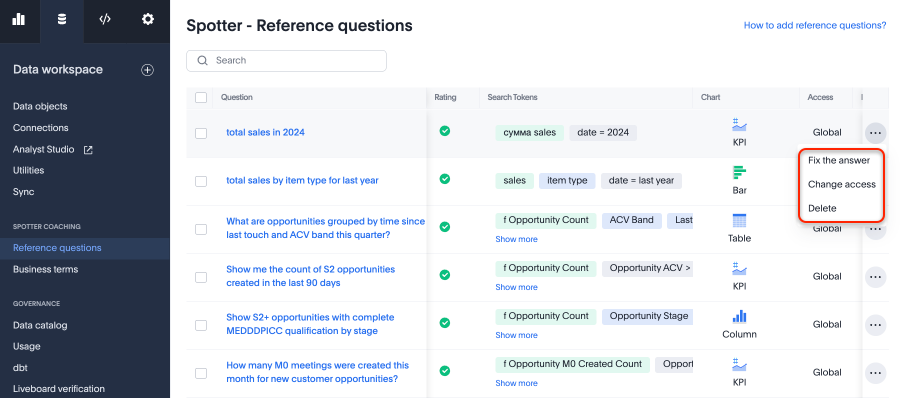
Model editors and administrators can fix, promote, or delete coaching entries from all users.
-
Navigate to the Data workspace and scroll to the Spotter coaching section.
-
Select the Reference questions or Business terms tab.
-
Find the entry you want to manage.
-
Click the More menu icon
and select an action:-
Fix the answer: Edit the coaching entry to improve accuracy.
-
Change access: Promote user-level coaching to global, or vice versa.
-
Delete: Remove the coaching entry.
-
-
Save your changes.
Permissions reference
The following table provides a detailed breakdown of permissions by access level.
| Access level | Can view | Can do |
|---|---|---|
No access |
Nothing (including previously submitted coaching) |
Nothing |
View access |
Your own coaching only |
Create user-level coaching |
Spotter coaching access |
All coaching on the Model |
Create global-level coaching |
Edit access |
All coaching on the Model |
All coaching actions |
Administrator |
All coaching across all Models in the Org |
All coaching actions across all Models |
| For Org-enabled instances, you can only view and manage coaching from the currently selected Org. |
Related information


