Coming soon
The following features are coming on March 3 in the next release of ThoughtSpot Cloud:
March 2026 26.3.0.cl
KPI chart settings Early Access
ThoughtSpot introduces more granular controls for KPI charts. You can now:
-
Decide how missing dates are displayed (as gaps, ignored, or treated as 0).
-
Specify whether to show or hide the current date, previous date, and previous value.
-
Abbreviate previous day (PD), previous month (PM), previous quarter (PQ), or previous year (PY).
-
Change shown as percentage or absolute value.
-
Specify whether the measure’s increase is a positive or negative change.
To enable this feature, contact your administrator.
Improved experience for Liveboard downloads and schedules Early Access
ThoughtSpot introduces an improved experience for Liveboard downloads and schedules:
-
When you select Download, you can now select CSV and XLSX in addition to PDF. When you select CSV or XLSX, you can choose which visualizations to download and a bulk download of the Liveboard data is triggered instead of a static image.
-
When you select Schedule, you can now select specific visualizations to include in the scheduled email attachment as CSV or XLSX files. You can choose any visualization including pivot tables and charts, not just tables.
For XLSX, there will be a combined file with all the visualizations in their respective tabs. If you still want to continue seeing individual XLSX files for schedules, please contact your administrator.
To enable this feature, contact your administrator.
Enhanced dynamic parameters in charts
Enhanced dynamic parameters are now generally available (GA) and on by default. You can use parameters across axis names, column names, answer titles and descriptions to change these elements dynamically based on the parameter value. A parameter used in the title or description always displays the value of the same parameter used in the chart itself.
Improved chart recommendations
Improved chart recommendations are now generally available (GA) and on by default. When you search, ThoughtSpot can automatically suggest a chart type based on your search query. The recommendations apply when using both Spotter and Search data. The following capabilities are improved:
-
When you submit a query for the first time, ThoughtSpot analyzes the data and automatically selects the most appropriate chart.
-
If you modify an existing query by adding or removing fields, ThoughtSpot retains the existing chart type unless it is forced to change.
-
When you drill down into data, ThoughtSpot maintains the current chart type whenever possible.
Add user-defined ID (object ID) in TML
You can now manage content across multiple Orgs without having to manually change the GUID of an object each time you move it between Orgs. You can directly add or edit an object ID in the TML of an Answer, table, Model, Liveboard, or View.
For more information, see Object ID in TML files.
Other features and enhancements
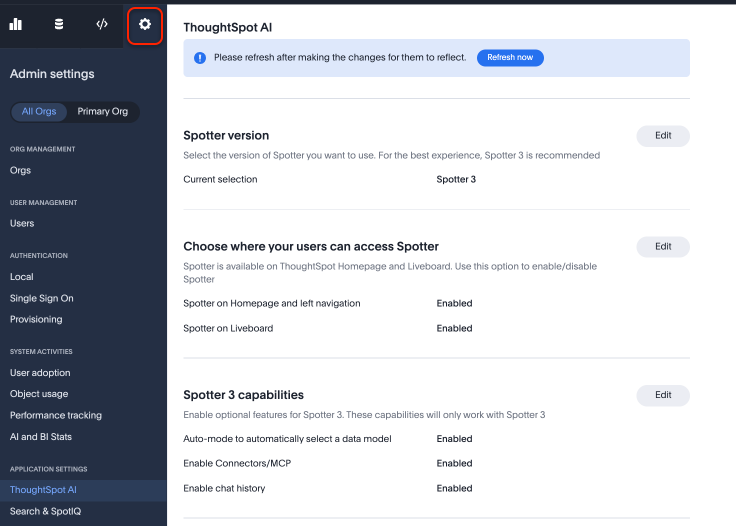
New admin settings locationThoughtSpot introduces a new user experience for Administration. Admin settings are now part of the left navigation panel.
|
Spotter coaching access
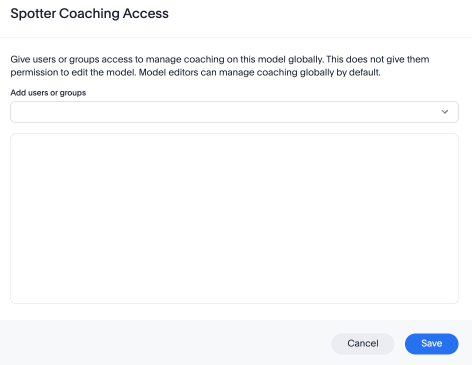
You can now grant coaching access to users or groups from the Spotter-enabled Model you want them to coach. Users with Spotter coaching access on a data model can import or export associated coaching TML, as well as grant Spotter coaching access to other users or groups. Sharing Spotter coaching access is no longer restricted to data model editors. You can also grant Spotter coaching access to system-level Models like the Query Stats Model, and on published data models. Spotter coaching access does not require users to have edit access to the Model.
Object Tracking Beta
ThoughtSpot now has a new data model, Object Tracking, to capture creation date, creator, last modification date, and last modifier for any supported Liveboard, Model, and Answer. Administrators can leverage this data model to build custom monitoring Liveboards, offering visibility into who created or modified objects and when these actions occurred.
Suggestion settings column
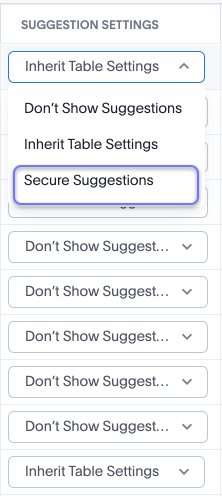
Suggestion settings are now generally available (GA). We have added the Suggestion Settings column to Models to allow you to control data that shows in typeahead suggestions and column knowledge cards. Previously, on Models with row-level security defined, you would see suggested names of data that you could not access in typeahead suggestions or in column knowledge cards.
For example, if you only had access to data in California, you could see that data for Texas existed, although you could not access the data. Set the Suggestion Settings column as Secure Suggestions to ensure users never see references to data they shouldn’t be able to access. To enable this feature, contact ThoughtSpot Support.
For more information, see Suggestion settings.
Column-level property for strict indexing and disabling typeahead
Column-level properties for strict indexing and disabling typeahead are now generally available (GA). To enable this feature, contact ThoughtSpot Support.
Publishing coaching to Orgs
ThoughtSpot now supports publishing Spotter coaching to Orgs. In addition to Org admins, now non-admin users with Spotter coaching management access on published data models in secondary Orgs can provide coaching access permissions to other users. They can also export/import coaching TML and share the data model with other users. Previously, coaching was Org-specific. Coaching changes made in the primary Org are synced with the secondary Orgs where the Model is published.
Delete subobjects in Collections
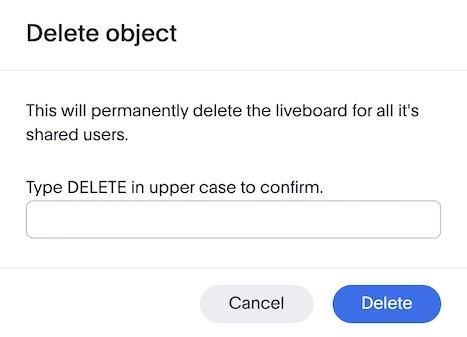
To reduce the risk of accidental data loss while deleting objects from a Collection, ThoughtSpot now has an additional step to the deletion process. If you choose to delete the objects in the Collection, or the Collection, you must explicitly type the word DELETE (in all caps) to confirm the action. If you do not type DELETE exactly as required, the deletion will not proceed.
Formula variables in query generation
The use of formula variables in query generation is now generally available (GA) and on by default. Formula variables can be of any data type that ThoughtSpot supports, and can be associated with a single value or list of values. Formula variables created in the primary Org can be shared with other Orgs. A formula variable created in a non-primary Org is only visible in that Org. For more information, see Formula variables.
Org-aware provisioned user reporting
The Provisioned users tab in the AI and BI Stats Liveboard can now be filtered by Orgs within ThoughtSpot. This allows you to see provisioned user counts and related metrics specifically for each Org, rather than just for the whole ThoughtSpot instance.
For the Developer
For new features and enhancements introduced in this release of ThoughtSpot Embedded, see ThoughtSpot Developer Documentation.


