Spotter 3 data handling
This article describes the changes in how ThoughtSpot handles your data in Spotter 3.
Security and governance
While previous versions of Spotter only process data, Spotter 3 is able to read user prompts, its responses, and even correct its own mistakes. This allows Spotter to access the same filtered data a user sees in ThoughtSpot, and provide deeper analytical insights, natural language summaries, and “Why” question analysis. To support Spotter 3 security, ThoughtSpot has created a robust data protection architecture to ensure that your organization’s security rules are Spotter’s security rules.
Secure data flow with Spotter
The secure data flow of Spotter ensures that your data remains protected at every stage. When you use Spotter, only the specific data required to answer your question is accessed—never entire tables or databases. All existing security rules, including column-level and row-level security, are strictly enforced, so Spotter only sees what each user is permitted to see.
The diagram below illustrates how your query moves through our secure layers, showing exactly how we maintain privacy from the moment you ask a question to the moment Spotter delivers an insight to you.
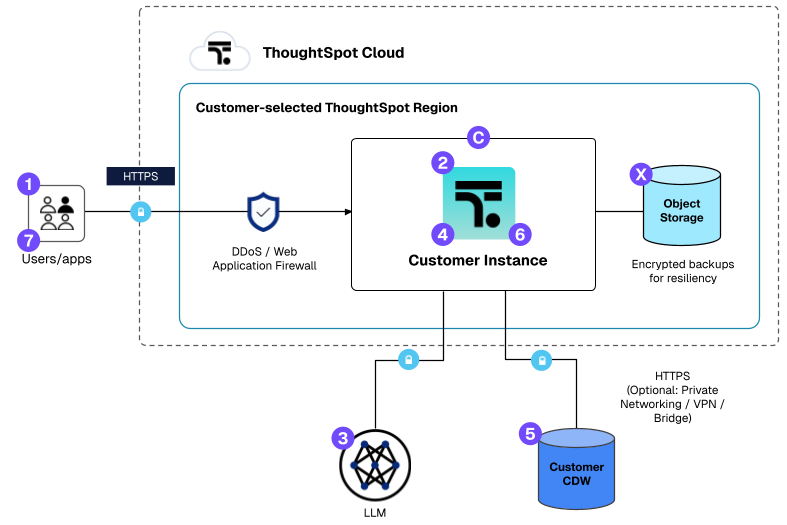
| Step | Description |
|---|---|
1 |
Users connect to ThoughtSpot Cloud securely over HTTPS. No local installation. |
2 |
Users interact with ThoughtSpot Cloud to view Liveboards, generate queries, and use Spotter. |
3 |
Spotter creates prompts that are sent to LLMs for processing. |
4 |
ThoughtSpot Cloud generates SQL that is securely sent to a customer’s cloud data warehouse (CDW). Spotter 3’s multi-step analytics creates additional LLM prompts, sending CDW query results to LLMs for analysis. Spotter 3 leverages LLM-created Python for advanced analysis, which is cached in Azure for six hours by default before deletion. The length of time your file persists depends on the Saved conversations setting; if saved conversations is disabled, the file persists for 6 hours. If saved conversations are enabled, the file persists as long as the conversation is saved (dependent the Chat history retention period setting in Admin settings > AI settings). |
5 |
Customer CDW executes SQL and returns only results to ThoughtSpot Cloud. |
6 |
ThoughtSpot Cloud renders the SQL results as HTML and sends it to the user. |
7 |
Customer’s users receive reports and visualizations in the browser. |
X |
Daily ThoughtSpot Cloud backups are taken and encrypted using AES-256. Backups include Spotter chat history and insights, if enabled. |
C |
ThoughtSpot ensures high availability and security with proactive monitoring and monthly updates. |
Data protection architecture
Spotter 3 utilizes a security mirroring architecture to ensure data integrity and privacy throughout the analytical process.
- Security parity
-
Spotter strictly honors existing data permissions. If a user cannot see a specific row or column in ThoughtSpot due to row-level or column-level security, that data is never sent to the Large Language Model (LLM).
- Minimalist transmission
-
Spotter never sends entire tables or databases to LLM providers. It only transmits the relevant, filtered query results necessary to answer the specific question that is asked.
- Stateless processing
-
While data context is sent to an LLM for real-time analysis, the LLMs provided by ThoughtSpot do not retain any data after processing.
- Encryption standards
-
All data in transit to the LLM is protected using HTTPS, and LLM-generated data is encrypted at rest within ThoughtSpot’s application databases.
Administrative controls
Administrators can manage data awareness and information persistence using the following controls:
| Control | Description | How to manage |
|---|---|---|
Spotter version |
An instance-level setting. Spotter 3 is disabled by default for existing instances. |
Admin > ThoughtSpot AI > Spotter version. |
LLM |
Your organization can provide their own LLM keys. Spotter supports connections to Azure OpenAI, Google Vertex AI, Amazon Bedrock and custom LLM gateways. This ensures prompts and data remain within your organization’s self-managed cloud environment. |
For details, see Connect to your Large Language Model (LLM). |
Column exclusion |
Leverage the hidden column feature in data models to prevent specific sensitive fields from ever being shared with an LLM. |
For details, see Hide a column or define a synonym. |
Previous Chats |
An instance-level setting which allows each user’s Spotter chat history to be accessible to them. |
Admin > ThoughtSpot AI > Spotter 3 capabilities > Enable chat history. |
Data pipeline |
Records all user interactions on the instance in the Spotter Conversations Liveboard. Enabled by default. |
To disable the data pipeline, contact ThoughtSpot Support. |
LLM data retention and storage
ThoughtSpot enforces strict retention and isolation protocols for all LLM-generated data such as summaries, insights, and logs.
- Previous Chats
-
Textual insights generated by Spotter are stored in the conversations for later consumption. These are retained for a default period of six months. Previous chats is an opt-in capability at the instance level. If you opt out, then data is persisted temporarily for up to six hours in the ThoughtSpot layer.
- Monitoring logs
-
Interaction logs are available in the Spotter Conversations Liveboard. Administrators can manually clean this storage or disable the pipeline entirely. Beginning July 2026, each event in the Spotter Conversations Liveboard is retained for 180 days and then removed automatically on a rolling basis, in line with the default 180-day retention applied to Spotter chat history. Administrators can still request manual cleanup, or request to disable the pipeline. Export any records you need to keep beyond 180 days, as CSV or Excel, before the cleanup.
- Data sovereignty
-
ThoughtSpot utilizes region-specific models to honor local data residency laws, ensuring data is processed within the required jurisdiction (for example, EU-based models for EU customers).
- Tenant isolation
-
Data is logically isolated per tenant. For customers requiring physical isolation, Virtual Private ThoughtSpot (VPT) is available upon request.
LLM provider compliance
ThoughtSpot maintains strict contractual agreements with LLM sub-processors to protect enterprise data.
- Zero training policy
-
Your data is never used to train the foundation models of foundational LLM providers.
- Exclusive use
-
Your data is used exclusively to generate insights for your current session and is never co-mingled or shared with other entities.
Implementation considerations
- Standard search limitation
-
If a column is hidden to restrict it from being shared with the LLM, it is also hidden from standard ThoughtSpot Search.
- User experience
-
If sensitive columns are visualized in a Liveboard but hidden from Spotter, the LLM will not have access to those columns, which may result in a suboptimal experience for follow-up questions.