Customize ThoughtSpot email template
ThoughtSpot now enables administrators to customize the branding, content, and visibility of components in notification emails. ThoughtSpot users receive notification emails for several events, including:
-
ThoughtSpot welcome emails
-
Sharing of Liveboards, visualizations, or saved answers
-
SpotIQ analysis results
-
KPI chart alerts
-
Liveboard schedules
| To customize Liveboard schedules, contact ThoughtSpot Support. |
Administrators can now customize these visual and functional components of system-generated emails:
- Visual Identity
-
Update the logo and color palette to match your brand guidelines.
- Custom Vocabulary
-
Custom vocabulary for notification emails. This allows you to replace ThoughtSpot specific terms like “ThoughtSpot,” “Liveboard,” “Answer,” and "SpotIQ," with your product terminology.
- Component Control
-
Toggle the visibility of specific email elements, including:
-
The nudge to download the ThoughtSpot mobile application.
-
Modify alert and Unsubscribe for KPI alert emails
-
Privacy policy links, Contact support details, and global footer text.
-
- Alert Preferences
-
Modify the Unsubscribe and Modify alert workflows specifically for KPI Alert emails.
|
How to customize email template
-
Navigate to Admin settings and click Email customizations under Application settings.
-
The current settings can be seen on the right panel for Test email. Values marked
Defaultrefer to ThoughtSpot default values. To edit these settings, click the Edit button.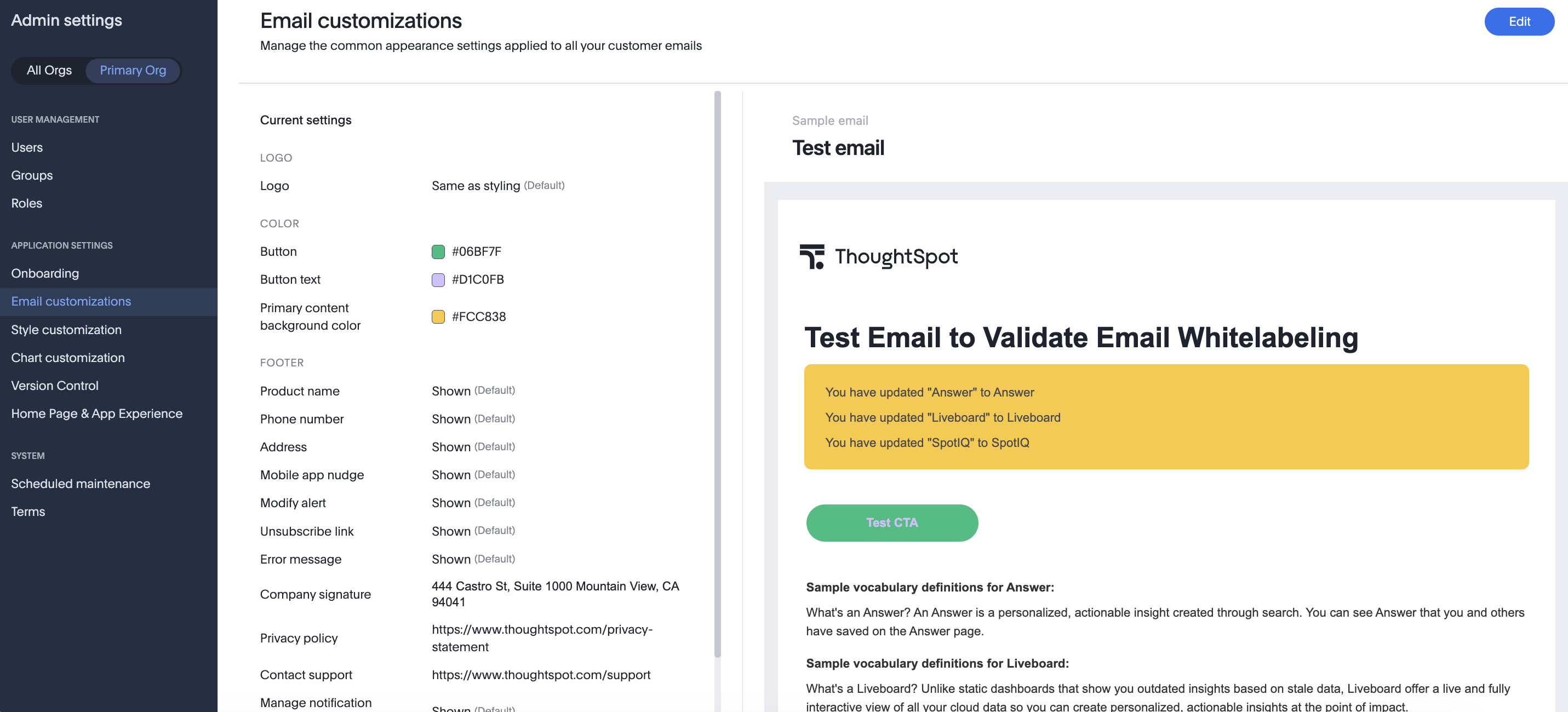
-
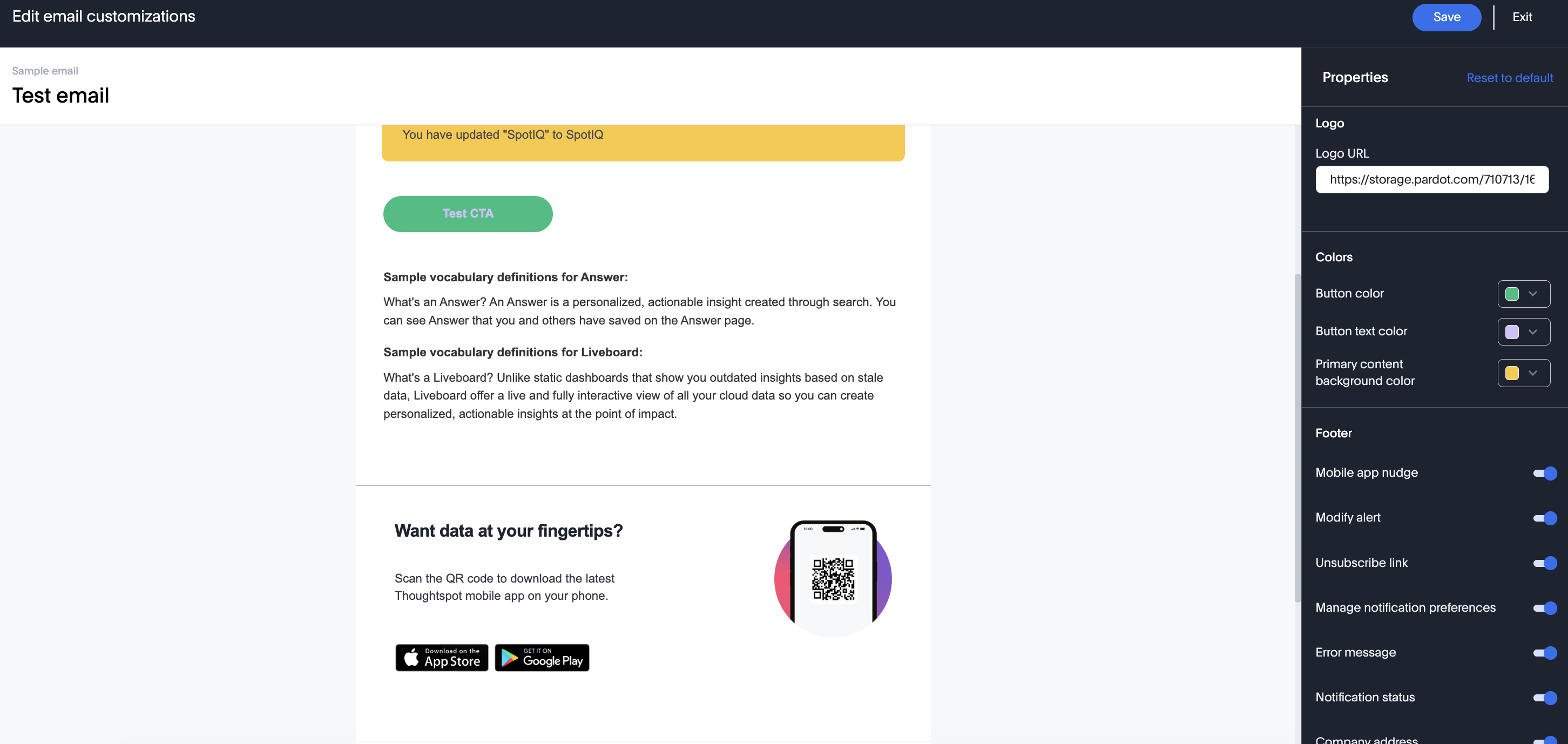
The edit modal opens.
-
The Edit modal has the live preview of the email on the left side, and the settings (Properties) on the right side. Changes made in the right edit panel are reflected instantly on the sample email, so you can see exactly how your changes look right away. Any combination of these properties will reflect instantly in the email preview on the left.
-
Once you are done, you can:
-
Click Save to save and apply the changes you made.
-
Click Exit to go back to the current settings, and move out of the edit modal.
-
Click Restore to default to reset to ThoughtSpot default.
-
| The settings for a particular Org will override the settings for All Orgs. |
Email properties supported for customization
| Properties | Corresponding API Payload | What it does |
|---|---|---|
Logo URL |
logo_url, hide_logo_url |
When toggled on, you can replace the ThoughtSpot logo with your company logo. To hide the logo entirely, simply toggle this option off. |
Button Color |
cta_button_bg_color |
Change the color of the CTA button. |
Button text color |
cta_text_font_color |
Change the color of the text on the CTA button. |
Primary Content background color |
primary_bg_color |
Change the color of the main content’s background. |
Mobile App Nudge |
hide_mobile_app_nudge |
Toggle the visibility of the nudge message for the ThoughtSpot Mobile app from all emails. |
Modify Alert |
hide_modify_alert |
Toggle the visibility of the Modify alert link in alert emails - clicking of this link will open up the KPI alert for which this email has been sent. |
Unsubscribe link |
hide_unsubscribe_link |
Toggle the visibility of the Unsubscribe link in alert emails - clicking of this link will open up the KPI alert for which this email has been sent and lets you unsubscribe to the alert. |
Manage Notification Preferences |
hide_manage_notification |
Toggle the visibility of manage notification preferences link in the footer - if shown, clicking on this will take you to the notification preference section in the user profile in ThoughtSpot. |
Notification status |
hide_notification_status |
Toggle the visibility of the disclaimer text you get along with the email -” you are getting this email because..” |
Company Address |
hide_footer_address |
Toggle the visibility of the address component in the footer. |
Company Address Text box |
footer_address |
Set the address of your organization in the footer. The content should not exceed 200 chars. |
Phone Number |
hide_footer_phone |
Toggle the visibility of the contact number component in the footer. |
Phone number Text box |
footer_phone |
Set the contact number of your organization in the footer. |
Product Name |
hide_product_name |
Toggle the visibility of the product name component in the footer. |
Product Name Text Box |
product_name |
Set the product name in the footer. The same is also used to replace all mentions of ThoughtSpot in the email. |
Vocabulary definitions |
hide_ts_vocabulary_definitions |
Toggle the visibility of ThoughtSpot vocabulary in share emails. |
Answer replacement value |
replacement_value_for_answer |
Replace the occurrences of the word Answer from emails. |
LB replacement value |
replacement_value_for_liveboard |
Replace the occurrences of the word Liveboard from emails. |
SpotIQ replacement value |
replacement_value_for_spot_iq |
Replace the occurrences of the word SpotIQ from emails. |
Privacy Policy |
hide_privacy_policy |
Toggle the visibility of privacy policy url from the footer. |
Contact Support |
hide_contact_support_url |
Toggle the visibility of contact support url from the footer. |
Company Website URL |
company_website_url |
Set the company website url to be routed to when you click on the logo or when you click on the product name (when visible) in the footer. |
Privacy Policy URL |
company_privacy_policy_url |
Replace the privacy policy url in the footer. |
Contact support URL |
contact_support_url |
Replace the contact support url in the footer. |
We highly recommend that you register for the free Customizing the ThoughtSpot UI course in ThoughtSpot University that covers the information in this article, and watch the Customizing Emails lesson.
See other training resources at ThoughtSpot University.

