Spotter answer explanations for token-based answers
A View explanation link now appears in token-based Spotter answers when ThoughtSpot can provide a detailed breakdown of how the answer was derived. The link appears both in Spotter itself and when you open an Answer using Spotter on Liveboards. This is the trust layer for users to understand how the answer was created. Click the link to open a panel where you can see how your question was interpreted, which columns and tables were used, and how the result was calculated.
Rollout of this feature begins in 26.12.0.cl and will be enabled for all users during a phased GA.
Token-based versus AgentQL-based Answers
In 26.12.0.cl, answer explanations are supported for token-based Answers, not AgentQL-based Answers. In practice, this means that you can access Answer explanations for questions that were asked in natural language, and derived from search tokens, but not for questions that were created using semantic SQL. Spotter reads the query you provide and decides whether to answer using tokens or AgentQL.
Support for answer explanations for AgentQL-based answers will be added in a future release.
Answer explanations
The Answer explanation panel breaks down how Spotter arrived at your Answer. It displays the original question, the columns used (split into measures, attributes, dates, and any filters or sort orders), and it summarizes how the data works. For example, it might say, “This query identifies specific products that experienced a major drop in inventory levels during the second half of 2020.”
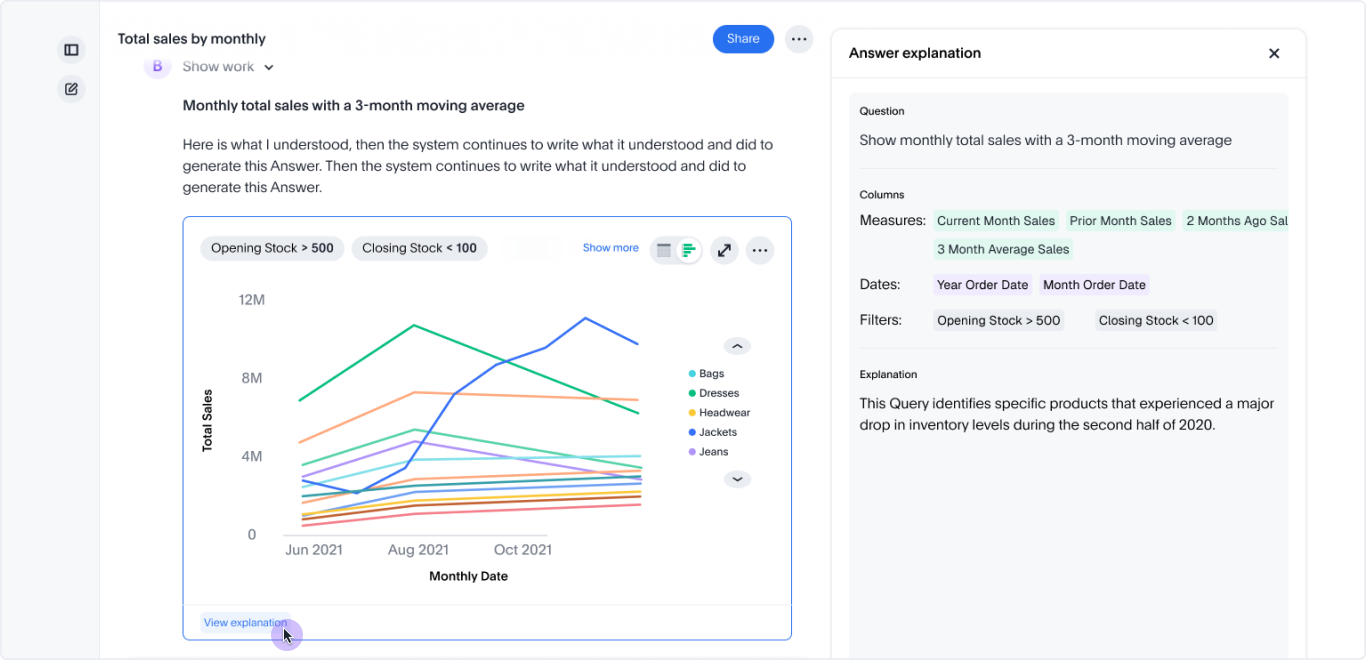
On wider screens, the panel opens to the right of the answer card. On narrower screens, it opens below the answer card. In the side panel view, you can drag the explanation’s borders to resize the panel.
