Slack connector in Spotter
The Slack Spotter connector bridges the gap between your data and your team’s communication. By integrating ThoughtSpot with the Slack Spotter connector, you can:
- Contextualize analysis
-
Reference Slack discussions within Spotter to add tacit knowledge and team context to your data.
- Share insights instantly
-
Post Spotter analyses directly to Slack channels.
- Distribute comprehensive reports
-
Add long form reports to Canvas files for easy team access.
Prerequisites
Follow these steps to install the Spotter app in your Slack workspace.
| You must install the app before starting the OAuth process. If the app is missing, the system cannot connect with your workspace, resulting in a connection error. |
Setup instructions
Once the Spotter app is installed in Slack, follow these steps to activate the connector:
-
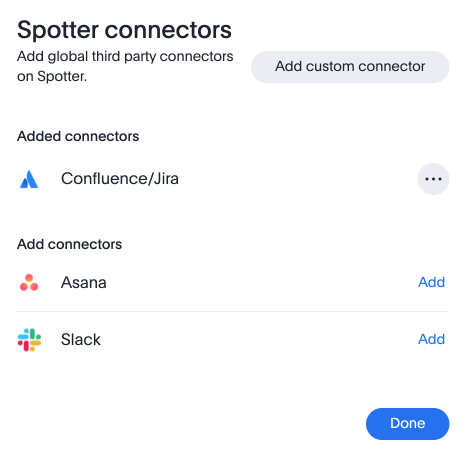
Open connector settings. Refer to the Spotter Connectors documentation.
-
Choose Slack from the pre-defined list of available connectors.
-
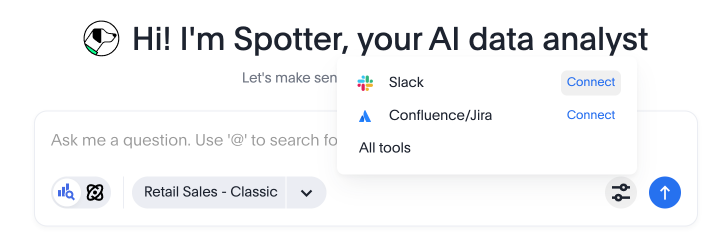
Navigate back to Spotter. Enable the Slack tool on Spotter and authorize the connection through the OAuth workflow when prompted.
-
Select the specific Slack Workspace you previously prepared.
-
Follow the on-screen prompts to grant ThoughtSpot the necessary permissions.
-
Once the OAuth handshake is successful, your Slack connector will be active and ready for use. You can now pull data into Spotter from specific Slack channels in your workspace, publish your analysis to Slack channels, or prompt Spotter to create a Slack canvas that you can reference in conversations in Slack.